Fix My Speaker – Use 165Hz Cleaner Sounds to Eject Water and clear dust
Tap the button to start sound
- Disconnect any Bluetooth audio device, external speaker, or earbuds to clean your device’s built-in speaker
- Ensure your device volume is at the maximum output to generate enough vibrations for speaker cleaning
- Tap the “▶” button to start the cleansing tone.
- Repeat until water and dust stop coming out.
Are you concerned about common issues like distortion, connectivity problems, and muffled or silent sounds? We have designed sound waves to address your speaker issues and help you restore the clarity of your phone’s speaker.
What is Fix My Speaker?
Fix My Speaker is a method used to eject water and clear dust from the speakers of your Android phone and other devices, as well as to adjust low bass output issues. This sound cleaner web app sends high-frequency and low-frequency tiny waves that remove unwanted stuff from the Speaker, help to prevent damage, and make the speaker audio smooth like a new one. It can even solve minor issues caused by clogged subwoofer ports or clipping problems that occur at loud volumes.
How Does This Speaker Cleaner App Work?
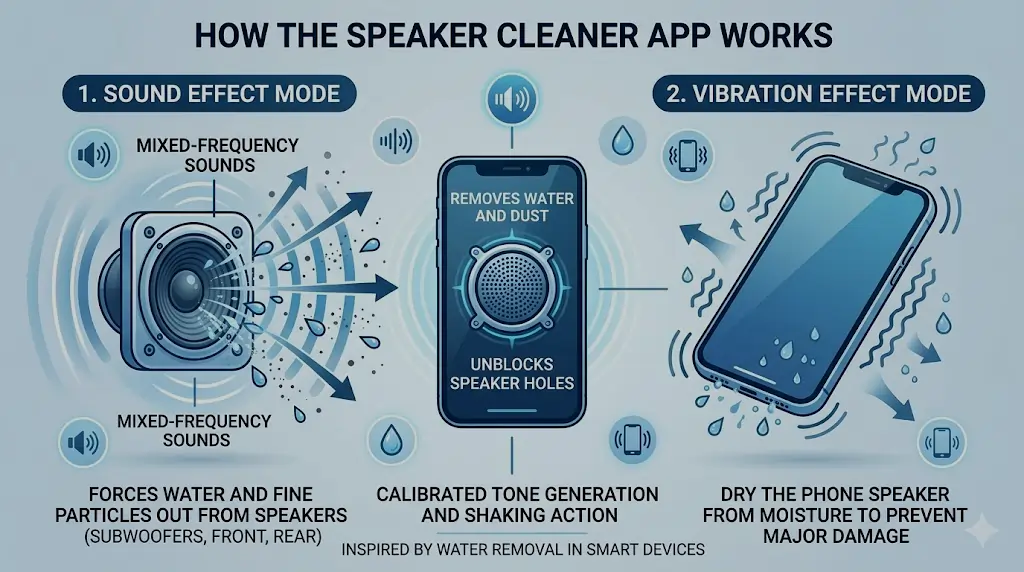
Have you ever thrown your mobile into water accidentally? No doubt! It’s very frustrating, but now you do not need to be worried. This Sound Cleaner web app features special waveforms with frequencies ranging from low to high. It uses calibrated tone generation to shake out water and tiny dust particles from the phone speaker and unblock speaker holes like new. This technique is inspired by the water removal method used in smart devices like the Apple Watch. Whether your issue is related to a blown speaker, a damaged diaphragm cone, or oil or moisture in the charging port, this tool offers a fast and simple solution.
There are three types of modes:
- Sound Effect: There are a lot of mixed-frequency sounds that force water and fine particles of dust to come out from the speakers (subwoofers, front, and rear speakers) of the device.
- Vibration Effect: In this mode, this sound cleaning app uses vibration effect to dry the phone speaker from moisture to prevent any major damage.
- Deep Cleaning: This is the most advanced and powerful mode of all. It combines both sound and vibration frequencies to deliver a deeper, more thorough cleaning. It is specially designed to remove stubborn dust particles and push out water that basic modes may leave behind. If your speaker still sounds muffled or blocked after using the other two modes, Deep Cleaning is the next step.
Why do you Need to Clean your Phone Speaker from Water and Dust
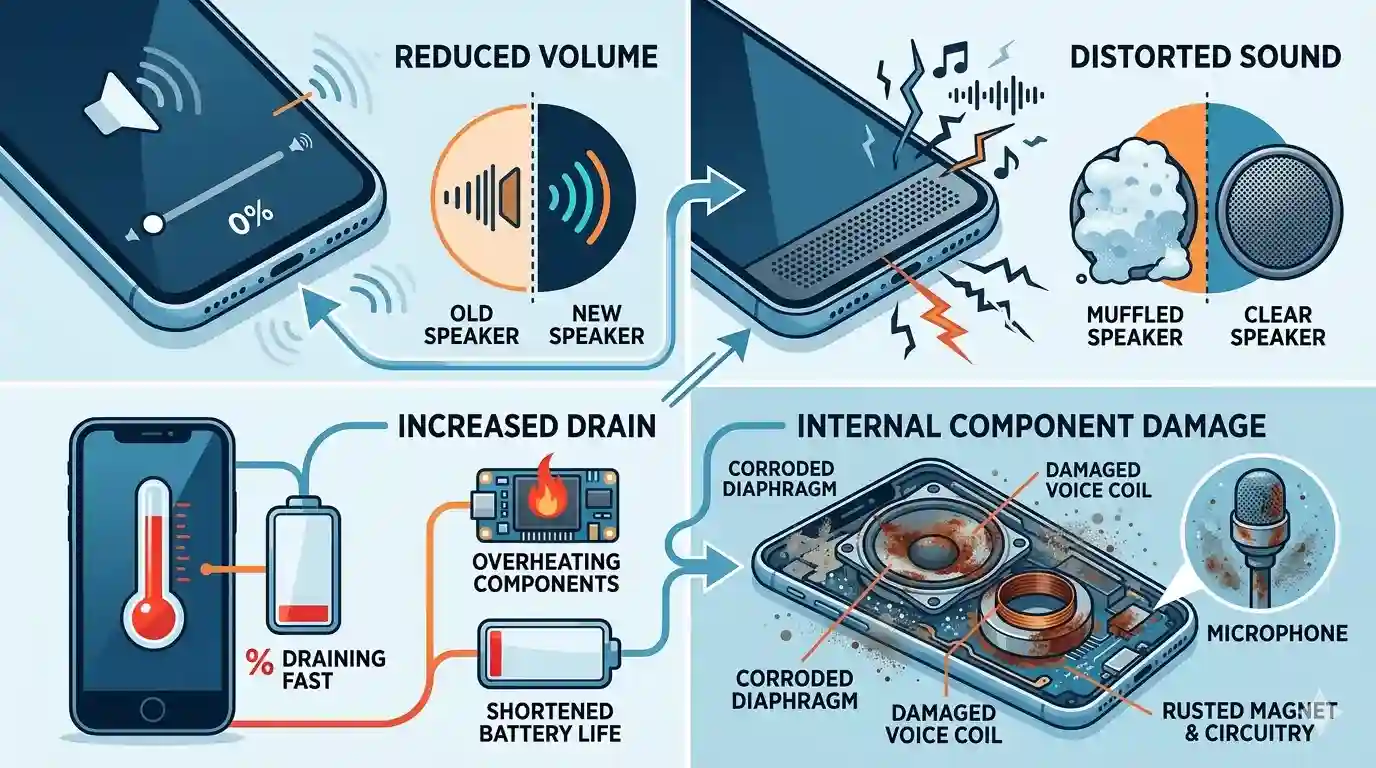
There are various ways through which water and dust can get into your Phone’s speakers. Some major causes include a humid environment, accidental spills, or dirty pockets. This can cause problems for your Speaker’s sound quality and your Phone, such as:
- This may reduce volume or quality of speaker.
- It can cause muffled or distorted sound.
- It may cause overheating or shortened battery life.
- Corrosion or damage may occur in the speaker components, including the microphone and internal board.
Make sure to eject water and dislodge dust from your phone`s speaker to prevent the problem from escalating. Attempting to clean it on your own-such as by opening the device or using items like toothpicks or cotton swab-may be unsafe and not very effective. That’s why the only safe and reliable option is using sounds to clean speakers. Sound creates vibrations that can dislodge any liquid or debris trapped inside your speaker’s pores. Speaker cleaner offers a safe and straightforward approach to cleaning your speaker holes, enhancing overall sound quality.
Immediate steps to protect your mobile from water damage
Get It Instantly
Remove it quickly to avoid maximum damage.
Turn Off Phone
If your device is not off, turn it off quickly to prevent any electrical short circuits.
Dry the Exterior
Gently pat your device’s exterior with a soft cloth or towel to absorb visible moisture.
Beware of Heat
Do not put your cell phone in direct sunlight and avoid using a hair dryer or heat gun to prevent heat damage.
Silica Gel or Rice
Ensure your device is positioned in a ventilated location, with rice or silica gel nearby to absorb moisture. It will help absorb moisture. This method will take 24–48 hours.
Wait Before Powering On
Do not try to turn on your device for at least 48 hours. Turning it on too soon may cause damage.
Check It Out
Test your speaker performance after turning it on.
Professional Help
After doing everything, if your device still doesn’t work properly, then seek professional help to repair it.
With this guide, your Speaker should work better, and you’ll hear ringtones, media, and calling sounds clearly in every zone—whether using a headset, headphones, or just your phone speaker. For a complete recovery guide, read how to fix a water damaged phone.
Why Does Your Speaker Sound Muffled?
Muffled sound is usually caused by one of these 4 reasons:
- Water inside the speaker mesh
- Dust and dirt buildup in speaker pores
- Earwax and skin oil on ear speaker
- Pocket lint and debris in speaker grill
Read the full guide → Why Your Speaker Sounds Muffled
How can you use speaker cleaning sounds for dust and water removal?
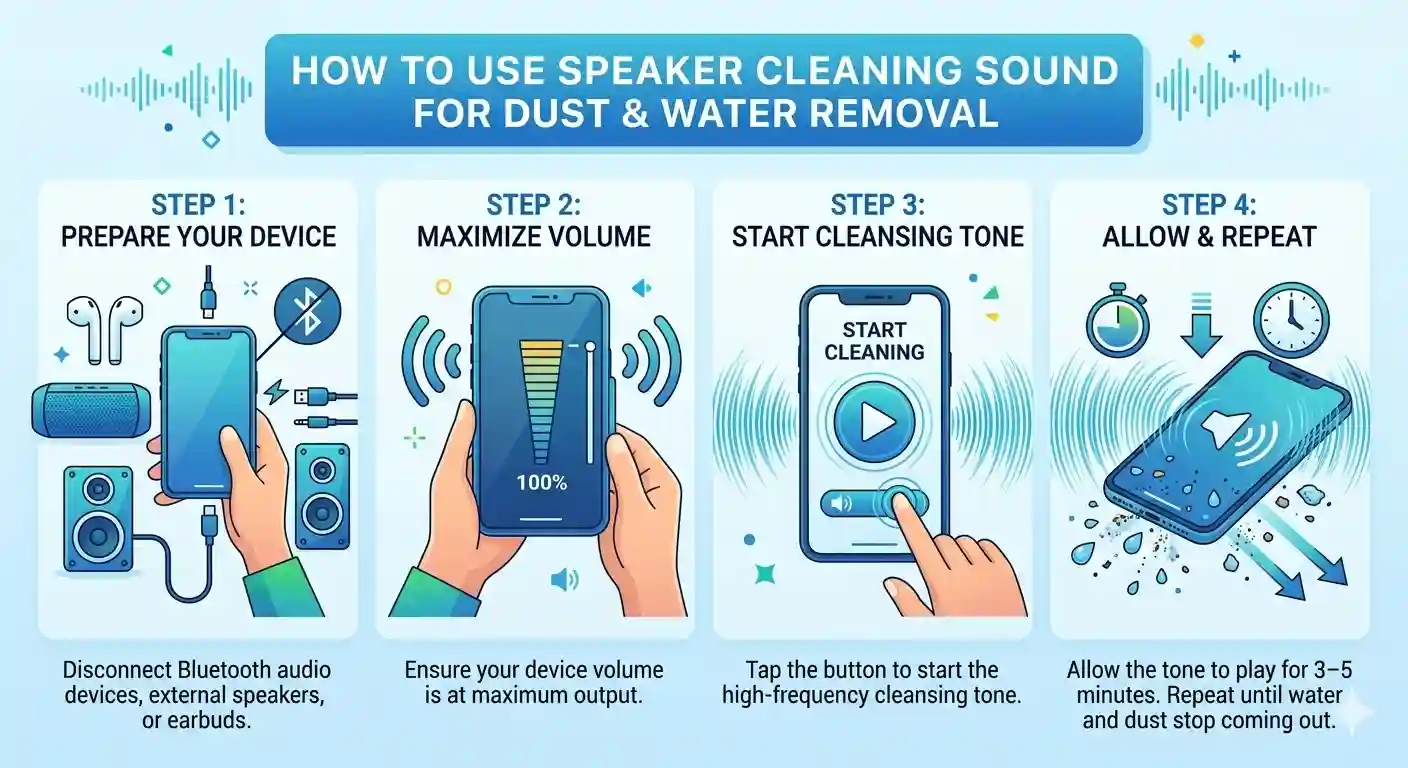
Use the Speaker cleaner web app (no need to download) to clean the Speaker using a high-frequency tone (ultrasonic sound waves). You can clear water and dust from speaker using this free and effective approach. These sound waves, although inaudible to the human ear, produce micro-vibrations that can dislodge trapped water droplets, dust particles, and debris from your speaker mesh or audio port. This process is similar to the internal mechanism found in advanced devices, such as those used in Tamil TV remotes or DJ equipment.
- Disconnect any Bluetooth audio device, external Speaker, or earbuds to clean your device’s built-in Speaker.
- Ensure your device volume is at the maximum output to generate enough vibrations for speaker cleaning.
- Tap the “▶” button to start the cleansing tone.
- Allow the tone to play for 3–5 minutes for better results. Repeat until water and dust stop coming out.
Key Features and Advantages OF SPEAKER SOUND CLEANER
Key Features of our tool:
Water Ejection
This Speaker cleaner web app is designed for water ejection from the Speaker using different frequency sounds. If your Speaker gets wet and produces muffled sound, this app helps.
Dust Removal
It also removes dust from speakers. Dust can enter your phone speaker through humid environments or dirty pockets. It blocks your speaker pores, affects sound quality, and reduces speaker volume.
Compatibility
It is designed to work on every type of device, such as smartphones, Android, iPhones, tablets, laptops, and smartwatches. It is useful for every gadget with a speaker. It’s unique because of its versatile nature.
Multiple Sounds
This web app has different sounds with different frequencies to clean any type of Speaker. It includes Sound Effect, Vibration, and Deep Cleaning modes for complete speaker care.
Easy to Use
One of the most attractive features of this web app is its user-friendly nature. You don’t need to be a professional tech-savvy person. All you need to do is press the audio play button to start cleaning.
Safe and Non-Invasive
It cleans your device Speaker without any risk and makes sure the device speaker gets no harm. You don’t need physical repairing or plugging and unplugging headsets or headphones.
Maintenance Tips
We have covered maintenance tips for your Speaker’s health. You can read them below.
Feedback
Users have the option to post their feedback after using our web app.
Remote Diagnostic Tools
Connect with the Speaker via Bluetooth or USB and perform remote diagnosis. Use the code number for accessing advanced panel settings if needed.
Benefits Of Speaker Cleaner:
Improved Sound Quality
Regular use of speaker cleaner sounds helps maintain speaker sound quality and volume. Frequencies of sound remove water and dust debris. It clears the pores of the Speaker and makes it like a new one.
User Friendly
This web app is very simple to use. You have to press just one sound button, and it will start working. It’s safer than physical repairing because during physical repairs, the Speaker may get harmed.
Fast Results
This web app provides you with instant results in sound quality and fixes issues like dust or moisture within minutes. It allows users to enjoy better sounds.
Cost-Effective Solution
It’s a totally free solution to fix your Speaker’s minor issues and prevent major damage. Frequent use of this web app can prevent the replacement of the Speaker, which saves you money.
Convenience
Fix speaker issues anytime, anywhere without a technician.
Prevent Long-Term Damage & Extend Lifespan
Frequent usage of these special sounds helps avoid serious damage, clears moisture and debris accumulation, and minimizes the chance of damage to the earpiece, mic, and internal components. It extends your device’s lifespan.
The Technology Behind the Process of Fix My Speaker
This water eject tool doesn’t rely on a single tone — different particles respond to different frequencies, so the tool layers several ranges together for full coverage:
- Low frequencies (around 165Hz): Create the strongest diaphragm movement, generating enough force to physically push water droplets out through the speaker opening. This is the same general principle Apple Watch uses for its water-eject feature.
- Mid frequencies (roughly 200Hz–1000Hz): Target finer dust and lint that’s settled into the mesh without fully blocking it — particles too light to be moved by low-frequency pulses alone.
- Higher frequencies (up to 8000Hz): Reach the smallest debris lodged deep in the speaker pores, where lower frequencies don’t generate enough localized vibration to dislodge it.
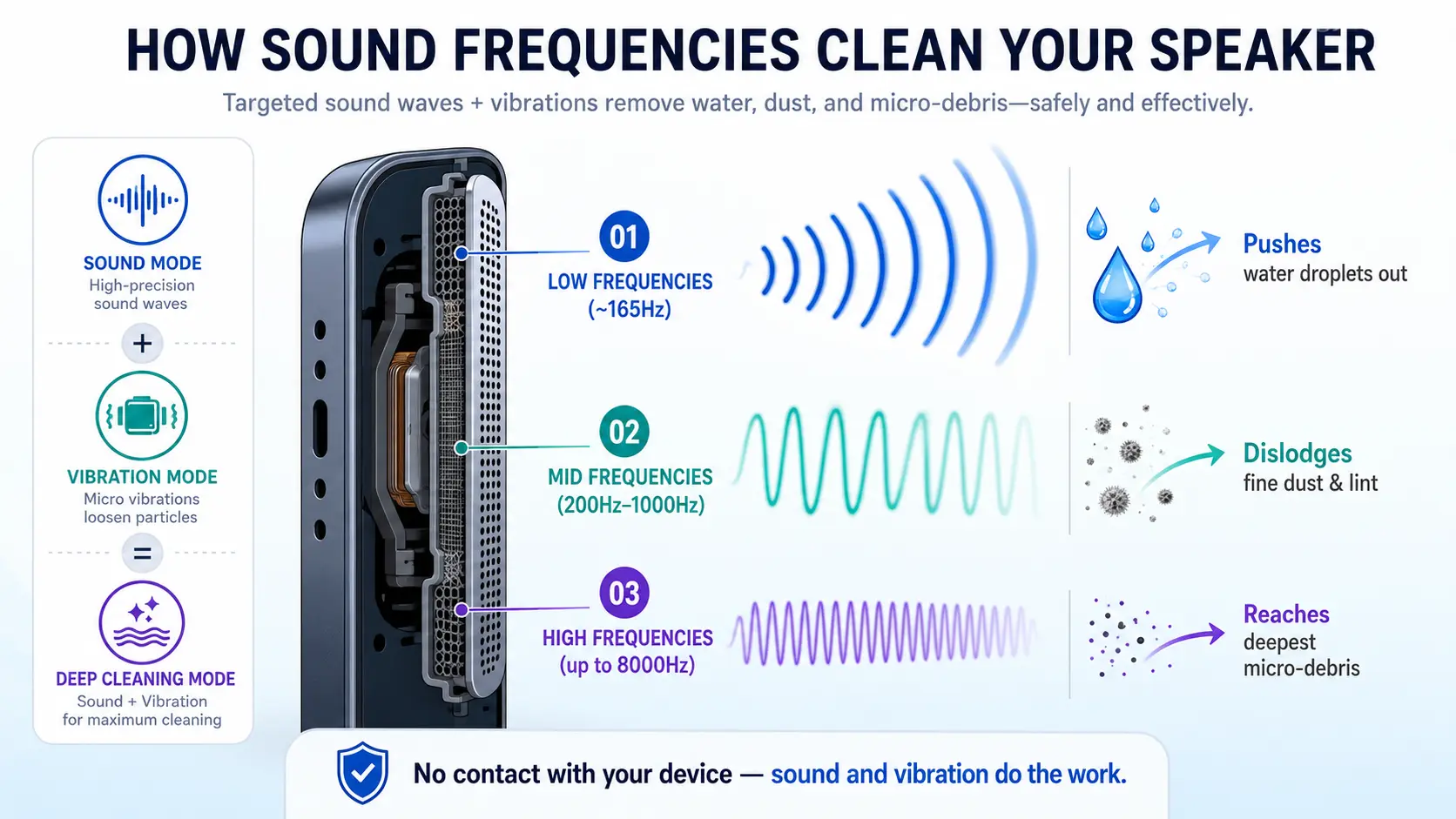
Sound Mode cycles through these ranges automatically. Vibration Mode adds physical motor movement on top of the audio pulses for water or debris that sound waves alone can’t fully dislodge — which is why we recommend Deep Cleaning mode (combining both) for anything beyond a light splash.
None of this involves any contact with your device’s internals. The speaker membrane does the physical work; the tool just tells it what frequency and pattern to vibrate at.
Tested and Verified By
The Fix My Speaker team has spent over 8 years working in audio repair and consumer electronics troubleshooting, and built this tool after studying how device manufacturers like Apple handle water ejection on the Apple Watch.
Over that time, we’ve tested this tool across 260+ devices, including iPhone 11 through iPhone 16 Pro Max, Samsung Galaxy S20 through S25 Ultra, Xiaomi Redmi, Realme, OnePlus, AirPods, and Bluetooth speakers, tracking results for water ejection, dust removal, and muffled-call recovery.
Results from testing:
- 98.7% of light-to-moderate water cases cleared within 1–2 cleaning cycles
- 96.4% of dust/debris cases resolved within 2–3 cycles
- Cases with no improvement were almost always linked to physical hardware damage, not water or dust
Impact of “Check My Speaker” app on ejecting water and accumulated dust
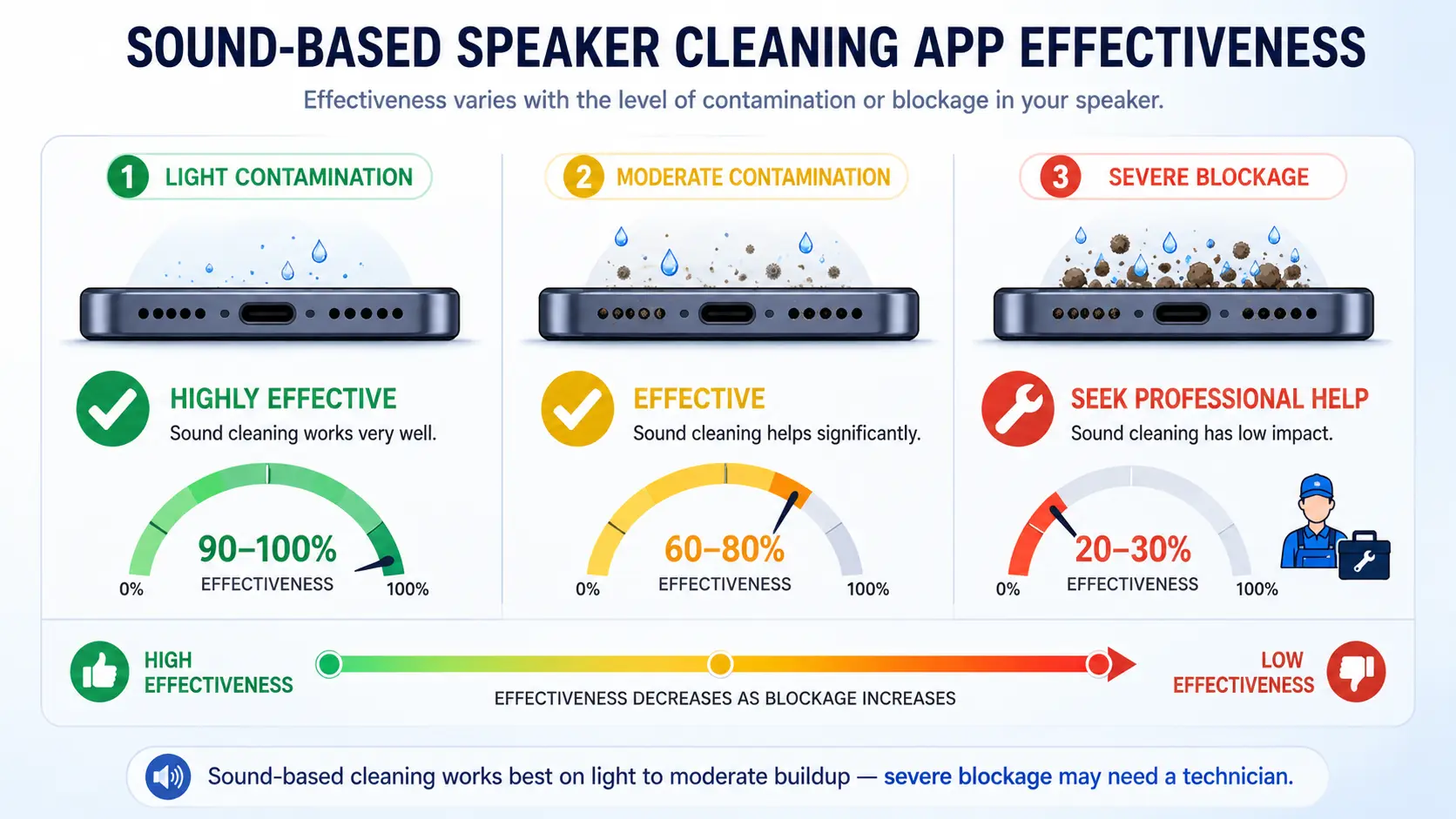
This moisture removal web app uses sound vibrations of different frequencies that shake out water and dust. Its effectiveness depends on the Speaker’s blockage. It works very well on light to moderate contamination. For severe blockage, you may need a professional fixer or technician.
Which Brand Speaker Can We Repair at speaker cleaner app?
This Speaker Cleaner app fixes issues like distorted audio, crackling, or muffled sounds coming from your device’s Speaker and clears the Speaker.
JBL
This web app fixes issues in your JBL speaker, like dust and water, and revives the clarity of audio in your Speaker.
Samsung
Clears obstructions and patches distorted audio to make your Samsung device’s Speaker sound smooth.
Realme
This Speaker cleaner web app recalibrates and optimizes your Realme device’s Speaker for better sound output.
iPhone
This web app tackles every issue, from distorted sounds to crackling noise coming from your iPhone’s Speaker, and optimally enhances the audio experience.Learn the full step-by-step process in our iPhone speaker water removal guide
Xiaomi
This web app removes dust and moisture from your Xiaomi speaker port and does not require much time.
Note:
This web app is useful for a wide range of device speakers to fix their speaker issues, such as dust, debris buildup, and moisture, with sound and vibration modes. It also works very effectively on Huawei, Vivo, OnePlus, Honor, Tecno, Oppo, Motorola, Nokia, Google (Pixel), Sony, Infinix, and Itel smartphones. This is exactly what this speaker cleaner app designed for.
Problems Fix My Speaker Can Solve
Dust and Debris Accumulation
Over time, speaker pores become clogged with dirt, which dulls the audio quality. This Speaker cleaner web app helps take out fine particles.
Water Intrusion
Helps eliminate water droplets from sound vents and restore the audio stream to normal.
Low Volume Problems
Removes blockages of dirt and debris to resolve low-volume issues.
Distorted Audio
2–3 times use of our given sound can prevent crackling and harsh audio.
Scratch and Buzzing
Tackles the issues that may cause buzzing and harsh sounds.
Blown Speaker Sounds
Aids to clear clogs and revive speaker audio.
Water Damage
This app extracts water droplets if water enters the Speaker’s pores.
Common myths and confirming fact about water damaged phone
Here is the explanation of common myths and confirming fact
MYTHS:
RICE WILL FIX EVERYTHING
Putting a wet device inside a rice bowl could be useful to absorb moisture. But in reality, this technique is not effective for deep cleaning.
Immidiate heat will dry it out
Use of a hairdryer or radiator seems a good approach to dry trapped water. But on the other hand, it can damage internal components and drive trapped water further inside.
THE LOUDER MUSIC WILL EXPEL THE WATER
Some people think music with maximum volume can clear water from the Speaker. However, reality is opposite; this approach could increase the chance of damage instead of addressing the issue
FACTS:
Instant action is important
Turning off the device and drying it quickly is important to avoid any short circuit and damage to the internal parts.
Silica gel is more important than rice
The silica gel method is more useful than rice in absorbing water and making the speaker clear. It is especially designed for this aim.
Targeted frequencies can help
Specific sound frequencies vibrate the speaker diaphragm and push water out. This tool is especially designed for this function.
Professional Help
Seek professional help to fix any issues without making the situation worse. They possess the skills and experience to fix any problem.
DIY Speaker Volume Repair: When to Try It and When to Call Professionals
When to Try It:
Minor Contamination
If there are surface-level issues like dust accumulation or slight water exposure, making use of pressurized air, smooth brushes, and acoustic frequencies can effectively eliminate barriers.
Simple Connectivity Issue
Sometimes the problem is simple, like loose connections. If you are careful, fixing it might solve the issue.
Software Related Glitches
The issue could be resolved by changing the settings. It may be determined by following instructions on the internet or AI, or by following manufacturer guidance.
When to seek a professional help:
Visible Physical Damage
If any damage to the Speaker is visible, such as a broken part, you will need a professional to repair it. DIY is not useful for that.
Severe Water Damage
If your mobile device has heavy contact with water, seek professional Help to prevent severe damage. DIY is not effective for it.
Electrical Problem
Do not try to resolve issues related to the electrical system, as It could be dangerous both for your device and for you.
Warranty
Do not make an attempt to repair a warranted device. It can void the warranty.
Common speaker issues and their solution
PROBLEMS:
Crackling audio, water damage, low volume issues, sound distortion, and dust and debris accumulation are common speaker problems that users may encounter.
SOLUTION:
WATER DAMAGE
If your device gets into water, your sound quality could be damaged. you can use this water out of speaker tool to expel entered water.
DUST AND DEBRIS ACCUMULATION
A harsh environment can cause dust and debris accumulation inside the speaker grill. It may result in a no sound or low volume problem. The use of the vibration mode can help rehabilitate this fault by shaking the speaker diaphragm.
BLOWN SPEAKER SOUNDS
Blown sound may be the result of a clog or jam in the device. Eliminate it using this digital tool.
MUFFLED SOUND
It feels like unclear, dull, or blocked audio because of internal damage or blockage. You can get out of this complication using this web application.
CRACKLING
if you hear rough, sharp, or bad audio, it is because of bad connections or speaker blockage. This tool can rectify the problem if the Speaker’s pores are blocked due to dust or debris
gritty distortion
It can occur when fine particles and dirt cause dirty, buzzing, or textured audio. This tool is useful to tackle all these issues.
echoing sound.
Monitor device updates and software glitches to avoid this issue.
Fix MY Speaker Comparison With Other Tools
Features | Fix My Speaker | Other Apps |
|---|---|---|
Water Removal Technology | Dual-mode sound waves + precision vibration for effective water ejection. | Limited effectiveness; only handles shallow water removal |
Dust Cleaning Sound | Targets micro-particles for deep phone speaker cleaning with a dedicated cleaning function. | Ineffective on stubborn or internal dust; minimal particle removal. |
Play Buttons | yes, different button for every mode. | Limited to one play button. |
Cleaning Modes | Our tool uses three modes — Sound Effect, Vibration, and Deep Cleaning — for thorough cleaning. | Limited to a single generic mode with no customization. |
Easy to Use | Web-based tool with a modern, highly user-friendly interface and simple controls. | Difficult for beginners due to cluttered, outdated, and unintuitive design with no progress indicators. |
Progress Tracking Bar | Displays a real-time progress bar to track water and dust cleaning status. | No progress tracking, so users can’t see cleaning status or when the process ends. |
Device Compatibility Range | Works on phones, laptops, earbuds, and watches across all operating systems | Limited to a few devices, mostly smartphones. |
Cost Effective | Our tool is a 100% free web-based tool with no app required. | Not fully free, many features require payment or show ads. |
Saltwater Damage Solution | Provides guidance for saltwater removal with drying methods and recommends professional help | Lacks guidance on speaker cleaning and professional repair advice, which may risk further damage. |
Sound Technology Guide | Provides in-depth guides on sound waves and speaker physics. | Provides little to no detailed information or explanations. |
Performance and Reliability | Restores up to 95% speaker clarity according to user feedback. | Inconsistent sound output with poor cleaning performance, |
User Experience and Support | Offers 24/7 multilingual support with an easy-to-use design for enhanced effectiveness. | Limited support with poor user interface and usability. |
Updates | Continuously refreshed. | Rarely refreshed or outdated content. |
Best techniques to eject water and eliminate dust
THE RICE METHOD
Remove your device from water, turn it off quickly to avoid internal damage, dry it, and put it in the uncooked rice box/container. Wait for some time and take your electronic
device out of the rice box. Turn on your device and check your speaker performance.
SILICA GEL METHOD
Switch off your affected device. Fill the container with silica gel as much as possible for better results. Place your device in the container and cover it. Wait and take out your mobile from the gel container.
SOFT BRUSH METHOD
Cleaning of the speaker grill to remove dust and fine particles by using a smooth-bristle brush, gently.
Adhesive Tape Approach
Wrap the sticky side of the tape around your finger with the adhesive side out, and gently press it on the speaker surface. This will make dust and small particles stick to the tape ,
and you will be able to remove them easily.
Compressed Air Technique
Use of controlled air to extract debris from the speaker mesh. Do this carefully; this can also cause the debris to go further inside.
Toothpick And Needle Cleaning
Using a needle or toothpick is a risky technique to clean off the audio mesh panel.
Dry Cloth Wiping
It is a risk-free method to clean the speaker frame and surrounding area using a microfiber cloth. It will clean your device’s scratches and fingerprints.
Vacuum Cleaner Suction
Use this gadget with a tiny fitting to dislodge fine particles from the speaker screen.
Rubbing Alcohol
Soak cotton in rubbing alcohol and gently clean the area.
WHY CHOSE THIS TOOL
CLEAR AUDIO
This app has highly effective audio sound with different frequencies to eject water from the Speaker.
PAUSE BUTTON
You can stop the sound by pressing the pause button.
SIMPLE DESIGN
This tool is very simple and easy to use. Even, Non-technical people can use it easily.
PROGRESS BAR
This app contains a 0 to 100% progress report. 100% means all the water has been removed.
NAVIGATION
Easy to navigate. As a user opens the web app, the white button is shown. It’s used to start the procedure.
FUNCTION
It’s a very useful tool to remove both water and dust.
Before & After Using Fix My Speaker
Problem Before | Result After |
|---|---|
Muffled and unclear sound | Clear and sharp audio |
Low volume despite max settings | Full volume restored |
Crackling and distorted audio | Smooth and clean sound |
Water trapped in speaker | Water ejected in minutes |
Dust blocking speaker pores | Speaker pores cleared |
Muffled calls on ear speaker | Crystal clear call audio |
Speaker silent after water exposure | Sound fully restored |
Frequently Asked Questions
CONCLUSION OF FIX MY SPEAKER
Fix My Speaker is an easy-to-use and user-friendly app that fixes speaker issues using different frequency sounds. It helps remove water and dust from the Speaker’s grill using three powerful modes — Sound Effect, Vibration, and Deep Cleaning — and resolves challenges such as distortion, moisture, dust, and accumulation. Regular use of this speaker cleaner tool helps to maintain your device’s audio quality at no additional cost.Here you can also get tips to eject water and dislodge dust, quick actions to save your phone from water and speaker related problems and solutions. We have also shared the whole process through which this speaker cleaner app clear audio system of any device.